 WebSoftOS
Construction ERP software in India for BOQ, RA bills and project cost control
BOQ, client and subcontractor RA bills, project budgets, material reconciliation and GST accounting — every site and every rupee in one cloud system.
- BOQ & revisions
- RA bills
- Site-wise costing
- GST ready
WebSoftOS Construction ERP is a cloud ERP for contractors and builders in India that connects BOQ, RA billing, project budgets, site material, labour and accounts in one system, so every bill and every bag of cement is tracked against a project and its margin. It is built on the open-source ERPNext platform with GST accounting included, and plans start at ₹2,999 per month.
What changes with Construction ERP
BOQ quantities, revisions and variation orders live in different Excel files, so nobody knows the current contract value.
One BOQ per project with revisions and variation orders linked — the current contract value is always on screen.
RA bills are prepared by hand and checked against measurement books that are not linked to the BOQ.
RA bills pull BOQ items, previous billed quantities and this month’s measurement, then work out retention and deductions.
Site material is issued without reconciliation against theoretical consumption, so wastage and theft go unnoticed.
Material reconciliation compares what was issued to site with theoretical consumption, item by item.
Project profit is only known after the project closes — too late to fix anything.
Budgets by cost code, alerts when spend crosses a limit, and a forecast at completion while there is still time to act.
Built for how Indian civil contractors work
BOQ software (bill of quantities) with revisions
A BOQ per project created from the tender BOQ, with cost codes, WBS and margin on every line, executed and balance quantity, and revisions linked to variation orders. New to BOQs? Read what a BOQ is.
Running account (RA) bill software with GST
Client RA bills are raised from BOQ items and measured quantities, with previous billing, deductions and GST worked out on the bill.
Subcontractor billing and retention money tracking
Subcontract work orders and subcontractor RA bills, with advances, back-charges and retention entries, recoveries and releases.
Site material consumption and indent tracking
Material requests (indents) from site, material movement between stores, and reconciliation of issued material against theoretical consumption.
Civil contractor project cost control
Budgets by cost code, alerts when spend crosses a limit, forecast at completion and a project profitability report.
Everything in Construction ERP
29 features across 6 modules — on top of accounting, GST, inventory and payroll.
Tender & BOQ
Price tenders right and freeze the contract BOQ, with every revision on record.
- Tender BOQ and vendor quote comparison
- BOQ with item-wise rates and quantities
- BOQ revisions with full history
- Variation orders and change requests
- Work breakdown structure (WBS) and cost codes
Billing
Bill clients from the BOQ and measurements — no more hand-built RA bills.
- Client RA bills linked to BOQ items
- Progress measurement sheets
- Payment certificates
- Retention entries, recovery and release
- Construction claims and extension of time
Subcontractors
Give subcontractors work orders and pay them on the same RA logic.
- Subcontract agreements and work orders
- Subcontract BOQ and subcontractor RA bills
- Advances, back-charges and recoveries
- Subcontractor evaluation and vendor rating
Cost control
See budget vs actual by cost code while the project is still running.
- Project budgets by cost code
- Budget alerts when spend crosses limits
- Forecast at completion
- Cash-flow forecast by project
- Project risk register
Site operations
Daily site reporting for material, labour and equipment.
- Daily progress reports
- Material movement and material reconciliation
- Muster rolls, overtime and labour productivity
- Equipment allocation, usage logs and breakdowns
- Site instructions, RFIs and technical queries
Quality & safety
Inspections, NCRs, permits and drawings in one controlled register.
- Inspection requests and ITPs
- Non-conformance reports (NCR)
- Permit to work, HSE incidents, toolbox talks
- Drawing register with revision history
- Document control and transmittals
How work flows in Construction ERP
- 1
Tender & BOQ
Compare vendor quotes, price the tender and freeze the contract BOQ with WBS and cost codes.
- 2
Plan & budget
Set project budgets by cost code and a cash-flow forecast before work starts.
- 3
Execute on site
Daily progress, muster rolls, material movement and equipment logs from each site.
- 4
Measure & bill
Measurement sheets become client RA bills; subcontractor RA bills follow the same way.
- 5
Control & close
Track budget health, NCRs and profitability every week, not only at handover.
Reports and registers, ready on day one
No spreadsheets to build — these come with the app and filter by company, branch and date.
Project profitability
Billed value, cost and margin for every project.
Budget health
Budget vs actual by cost code, with overruns highlighted.
Progress S-curve
Planned vs actual progress over time.
Material reconciliation summary
Issued vs theoretical consumption — wastage by item.
Project KPI dashboard
Headline numbers for every running project on one screen.
Open NCR register
Non-conformances still open, by project and age.
RFI log
Site RFIs and technical queries with their status.
Drawing status register
Latest revision and status of every drawing.
Inspection turnaround
How long inspection requests take to clear.
Ask your Construction ERP in plain language
Hermes AI agents read your live data, answer questions and prepare drafts. A person always reviews and submits.
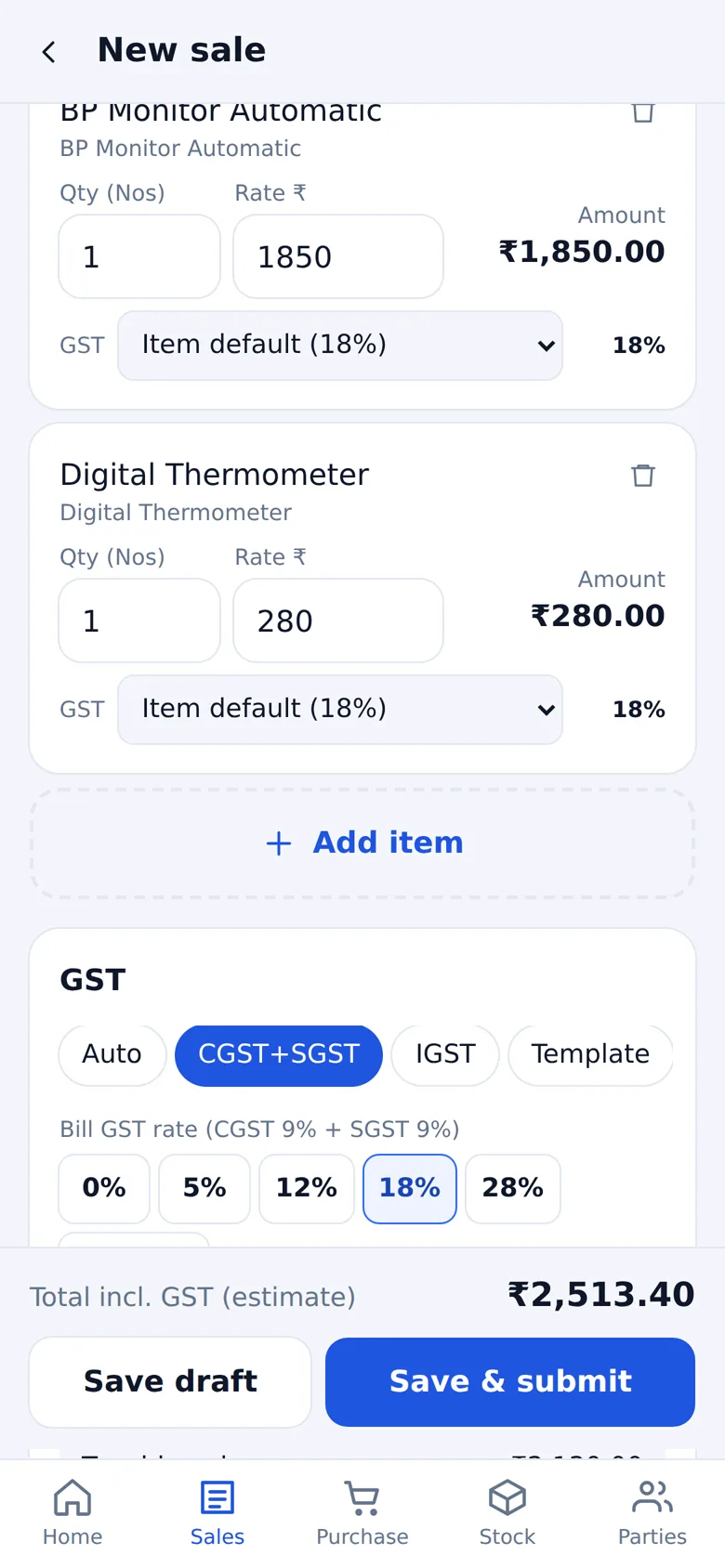
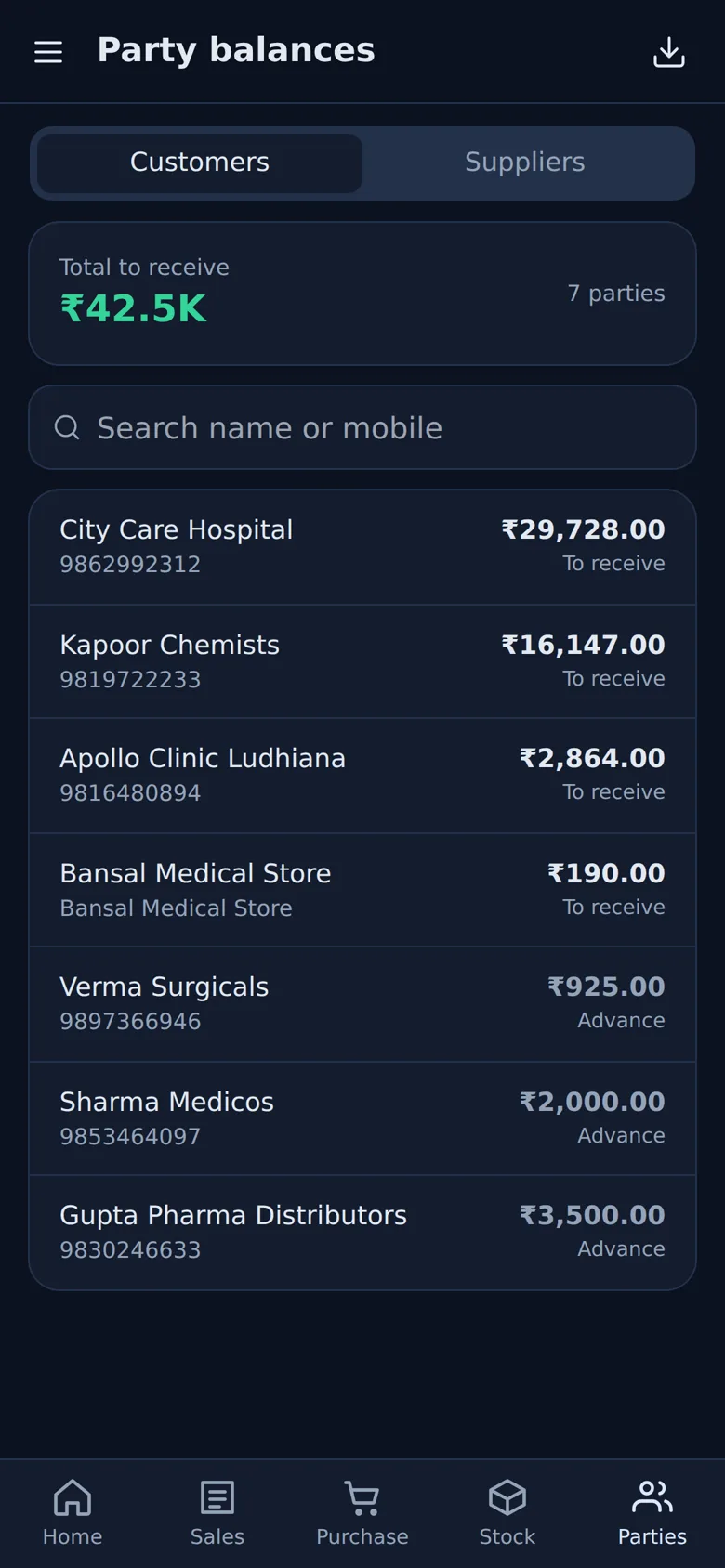
Run the accounts of your Construction ERP from your phone
Owners and managers can check site purchases, supplier dues, cash and GST on the WebSoftOS Business app — live on the same books as the desk.
- GST bills with flexible GST — auto by state, any rate, per item
- Receive and make payments, record expenses
- Stock, party balances and WhatsApp payment reminders
- GSTR-3B, GSTR-1, HSN summary and P&L
Android and iPhone, installed from the browser. BOQ, RA bills and subcontractor work orders stay in the full web ERP.
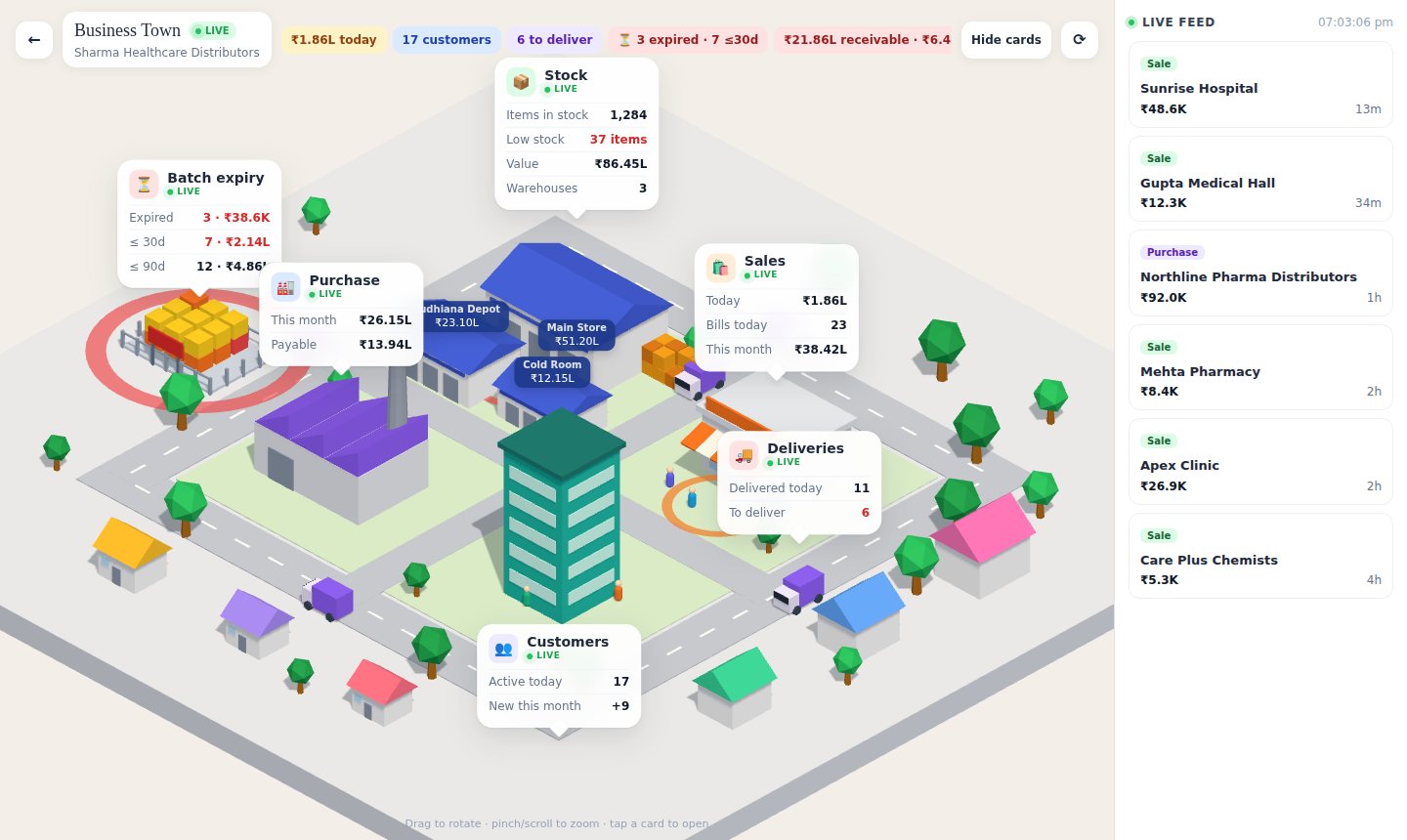
Your construction company, live in 3D
See the accounts side of your construction company — sales, purchases, stock, receivables and cash — as one live 3D view.
- Today’s and this month’s sales and purchases
- Stock value and warehouse-wise stock
- Receivables, overdue and cash and bank
- Live feed of the latest bills
Opens in any browser or on your phone, with your ERP login. Industry screens such as projects, trips or classes stay in the ERP.
Built on the WebSoftOS core
GST & e-invoicing
GST invoices, e-invoice and e-way bill generated from the same transaction.
Inventory & warehouses
Batches, expiry, multiple godowns and stock that always matches the books.
Statutory payroll
PF, ESI, professional tax and TDS calculated in one payroll run.
Hermes AI agents Add-on
Add-on for every app: agents answer questions on live data and draft routine entries for your approval.
Automatic backups
Every site is backed up automatically and served over HTTPS.
Your own domain
Run on a WebSoftOS subdomain or your own domain with role-based access.
Who it is for
- Civil, infrastructure and building contractors running 2–50 projects at a time
- EPC and turnkey companies that bill clients through RA bills and pay subcontractors the same way
- Builders and developers who need project-wise budgets and cost-to-complete
- Companies moving off Tally + Excel where the BOQ, bills and site data never match
Integrations
- GST, e-invoice and e-way bill (India compliance)
- Accounts, purchase and inventory (ERPNext core)
- Payroll for site staff and labour
- Excel / Tally data import during onboarding
Combine with other modules
Every WebSoftOS module runs on the same accounts and login, so you can add more as you grow.
Construction ERP vs Tally Prime and Busy
| Tally Prime / Busy | WebSoftOS Construction ERP | |
|---|---|---|
| Where it runs | Installed on an office PC or LAN; remote use needs remote access or third-party hosting | In the browser, fully hosted — nothing to install |
| Industry workflows | Not built in; needs add-ons (TDL) or Excel | Built in for your industry |
| GST e-invoice and e-way bill | Supported | Supported, from the same transaction |
| Backups | Your responsibility | Automatic backups |
| Pricing | Licence plus yearly renewal for updates | Monthly plans from ₹1,199 + GST, free live demo |
Moving from desktop accounting? See the full Tally alternative and Busy alternative comparisons.
Managed ERPNext for construction in India
WebSoftOS is built on ERPNext, the open-source ERP, and runs it for you as a managed service: hosting, automatic backups, updates, India GST compliance and the Construction modules are included, from ₹1,199 per month plus GST. You get ERPNext without running a server or paying for separate hosting, and your data can be exported at any time.
Pricing
Construction ERP runs on the same WebSoftOS platform plans: a free live demo, Starter at ₹1,199/month (3 users), Growth at ₹2,999/month (10 users), Pro at ₹5,999/month (25 users), plus GST. Each plan is a fully hosted ERP site with automatic backups, HTTPS and your own domain. See pricing for current inclusions.
Implementation
A typical single-company construction rollout takes 2–4 weeks: we set up your companies, cost codes and approval roles, import open projects with their BOQs and the opening balances from Tally or Excel, and train your billing engineer, site store keeper and accounts team in separate sessions.
Construction guides for Indian businesses
What actually gets deducted from an RA bill: retention, TDS, GST TDS and labour cess
What actually gets deducted from a contractor’s RA bill in India: retention, income-tax TDS, GST TDS, labour cess and advance recovery, with a ₹50 lakh worked example.
Read post → ConstructionConstruction ERP cost in India, and when a contractor should switch from Tally and Excel
What a construction ERP costs a contractor in India (subscription, setup, training), eight signs it is time to leave Tally and Excel, and when staying is fine.
Read post → ConstructionBOQ vs RA bill: how running bills work in construction
What a Bill of Quantities is, what an RA bill is, how they link, and how retention and variations fit in. A plain-language guide for contractors.
Read post →Frequently asked questions
What is the best ERP for construction companies in India?
The best fit is one that links BOQ, RA billing, site material and accounts so project margin is visible while work is still going on — and handles GST. WebSoftOS Construction ERP does this on a cloud ERPNext base; larger EPC firms with SAP budgets may still choose SAP, and very small contractors may manage with Tally plus Excel.
Can it prepare RA bills directly from the BOQ?
Yes. Client RA bills pull BOQ items, previous billed quantities and the current measurement, then calculate the bill value, retention and deductions. Subcontractor RA bills work the same way against the subcontract BOQ.
Does it track BOQ revisions and variation orders?
Yes. Every BOQ revision is stored with its line items, and variation orders and change requests are linked to the project so the revised contract value is always current.
Can we track material wastage on site?
Material reconciliation compares material issued to site against theoretical consumption from measured work, so you can see wastage by item and by project.
Can we migrate from Tally?
Yes. Ledgers, opening balances, items and parties are imported from Tally or Excel during onboarding. See Tally alternative.
Which affordable construction ERP in India has BOQ and RA billing?
WebSoftOS Construction ERP includes BOQ with revisions, client and subcontractor RA bills, retention and GST accounting, on cloud plans starting at ₹2,999 per month (Growth plan) with a free live demo.
What is a good Tally alternative for civil contractors to track site-wise material and labour cost?
Tally handles accounts well but has no BOQ, RA bill or site material module of its own. WebSoftOS Construction ERP keeps accounting and GST and adds project budgets, material reconciliation and muster rolls by site, and Tally ledgers and balances are imported during onboarding.
Related resources
Construction Profit Calculator
Free contractor profit calculator for Indian construction projects: contract value vs material, labour, subcontract, equipment and overheads, with margin %, cost breakdown and retention — formula and worked example included.
Use calculator → Free toolProject Cost Calculator
Free project cost estimator: direct cost, overheads, contingency, target margin and GST to arrive at a quote value for construction and contracting jobs.
Use calculator → Free toolBOQ Calculator
Free online BOQ calculator: add items with unit, quantity and rate, get amounts, sub-total, GST and grand total, and export the bill of quantities to CSV.
Use calculator → TemplateConstruction BOQ Template
Free BOQ format in Excel for construction: bill of quantities template with item no., description, unit, quantity, rate and amount, GST and grand total.
Download → TemplateConstruction Project Budget Template
Free construction project budget template: budget, committed and actual cost by cost head, variance and percentage used, with totals.
Download → TemplateProject Cost Sheet
Free project cost sheet Excel template: material, labour, equipment and subcontract lines with overheads, contingency, profit margin and GST to quote value.
Download → TemplateContractor Payment Sheet
Free subcontractor/contractor payment template: gross bill value, previous bills, retention, TDS, advance recovery and net payable per RA bill.
Download → GuideHow to track construction project profitability during execution
How Indian contractors can track construction project profit while work is in progress: BOQ, cost codes, RA bills vs cost, material reconciliation, forecast at completion.
Read guide → CompareA cloud ERP alternative to Tally
Looking for a Tally alternative? Compare TallyPrime with WebSoftOS cloud ERP: accounting, GST, inventory, industry modules, remote access, and when Tally is still the better choice.
Read comparison → CompareExcel vs ERP: when it is time to move
Excel vs ERP: when spreadsheets break down for billing, stock, payroll and projects — and how to move to a cloud ERP without losing what works.
Read comparison → CompareReplacing a legacy ERP
Replacing an old on-premise or custom-built ERP: costs, risks, data migration, and how a managed cloud ERP compares.
Read comparison →