 WebSoftOS
Payroll software in India with automatic PF, ESI, PT and TDS
Salary processing with PF, ESI, PT and TDS, bank transfer files, statutory returns and multi-company billing — built for HR teams and payroll bureaus.
- PF / ESI / PT
- TDS
- Bank files
- Multi-company
WebSoftOS Payroll OS is cloud payroll software built for Indian statutory payroll. It calculates PF, ESI, professional tax, LWF and TDS (old and new regime), handles arrears, bonus, gratuity, loans and full-and-final settlement, generates bank transfer files, and supports multi-company payroll with client billing for payroll outsourcing firms.
What changes with Payroll & HR ERP
Payroll takes days every month because attendance, arrears and deductions are stitched together in Excel.
Attendance, arrears and adjustments go into one payroll run with a checklist and approvals.
PF, ESI and PT rules (wage ceilings, state slabs) are applied by hand and errors cause notices.
PF wage ceilings, ESI, state PT slabs and LWF are configured once and applied in every run.
TDS projections ignore regime choice and declarations until the last quarter.
Old and new regime slabs, declarations and proofs drive TDS from the first month.
Payroll bureaus bill clients manually from their own payroll sheets.
Payroll invoices are generated from the client billing configuration and rate tiers.
Built for Indian payroll teams and payroll bureaus
EPF ECR file and ESI return data
Generates the PF ECR text file for the EPFO portal, ESI return summary data, the PT register and Form 16 summaries.
Contractor labour attendance and wage sheets
Attendance input and biometric devices, labour contractors and contractor settlement for factory and site workforces.
Salary bank transfer files
Bank templates for salary files, bank transfer batches and approved bank-account changes.
Multi-company payroll for bureaus and CA firms
Client companies and branches, client billing with rate tiers and payroll invoices from one system.
Full and final settlement with gratuity
Exit clearance by department, then an F&F that works out pending salary, notice pay or recovery, leave encashment, gratuity and arrears, with gratuity rules set per client.
Bonus, arrears and retro payroll
Statutory bonus by financial year with the bonus percentage, wage ceilings and qualifying days you set; salary revisions produce arrears automatically, and a retro run corrects a past month.
Everything in Payroll & HR ERP
29 features across 6 modules — on top of accounting, GST, inventory and payroll.
Payroll processing
Monthly payroll runs with checklists and approvals.
- Payroll calendar and payroll runs with checklists
- Run snapshots, transitions and approvals
- Attendance input and biometric devices
- Arrear computation and payroll adjustments
- Parallel-run checks with discrepancy reports
Statutory
PF, ESI, PT and LWF set up once, applied every run.
- PF configuration (wage ceiling, EPS/EDLI)
- ESI configuration
- Professional tax slabs by state
- Labour welfare fund
- Statutory registers
Income tax
Old and new regime, declarations, proofs and TDS.
- Old and new tax regime slabs
- Tax declarations and proofs
- TDS challans
- Employee YTD openings for mid-year joiners
Benefits & exits
Bonus, gratuity, loans, insurance and F&F.
- Bonus configuration and computation
- Gratuity configuration and ledger
- Loans and repayments
- Insurance policies, enrolment and claims
- Employee exit, clearance and F&F settlement
Payments
Bank salary files and approved account changes.
- Bank templates for salary files
- Bank transfer batches and records
- Bank-account change requests with approval
- Salary ledger
Multi-company & bureau
Client billing and contractor settlement for bureaus.
- Client companies and branches
- Client billing configuration and rate tiers
- Payroll invoices
- Labour contractors and contractor settlement
- Cost allocation templates
- Payroll SLA and case management
How work flows in Payroll & HR ERP
- 1
Collect attendance
Attendance comes from biometric devices or uploads; the payroll calendar is set.
- 2
Run payroll
Earnings, deductions, arrears and adjustments in one run with a checklist.
- 3
Check & approve
Snapshots and approvals; parallel-run checks flag any discrepancy.
- 4
Pay
Bank transfer batches in your bank’s file format; payslips go out.
- 5
Comply
PF, ESI, PT and TDS figures for filing; bureaus raise payroll invoices.
Reports and registers, ready on day one
No spreadsheets to build — these come with the app and filter by company, branch and date.
Salary ledger
Every employee’s pay history.
Statutory registers
Registers required under labour laws.
Parallel-run discrepancy report
Differences against your old payroll before go-live.
TDS challans
Tax deducted and deposited.
Gratuity ledger
Gratuity provision by employee.
Payroll invoices
What each client company is billed (bureaus).
Ask your Payroll & HR ERP in plain language
Hermes AI agents read your live data, answer questions and prepare drafts. A person always reviews and submits.
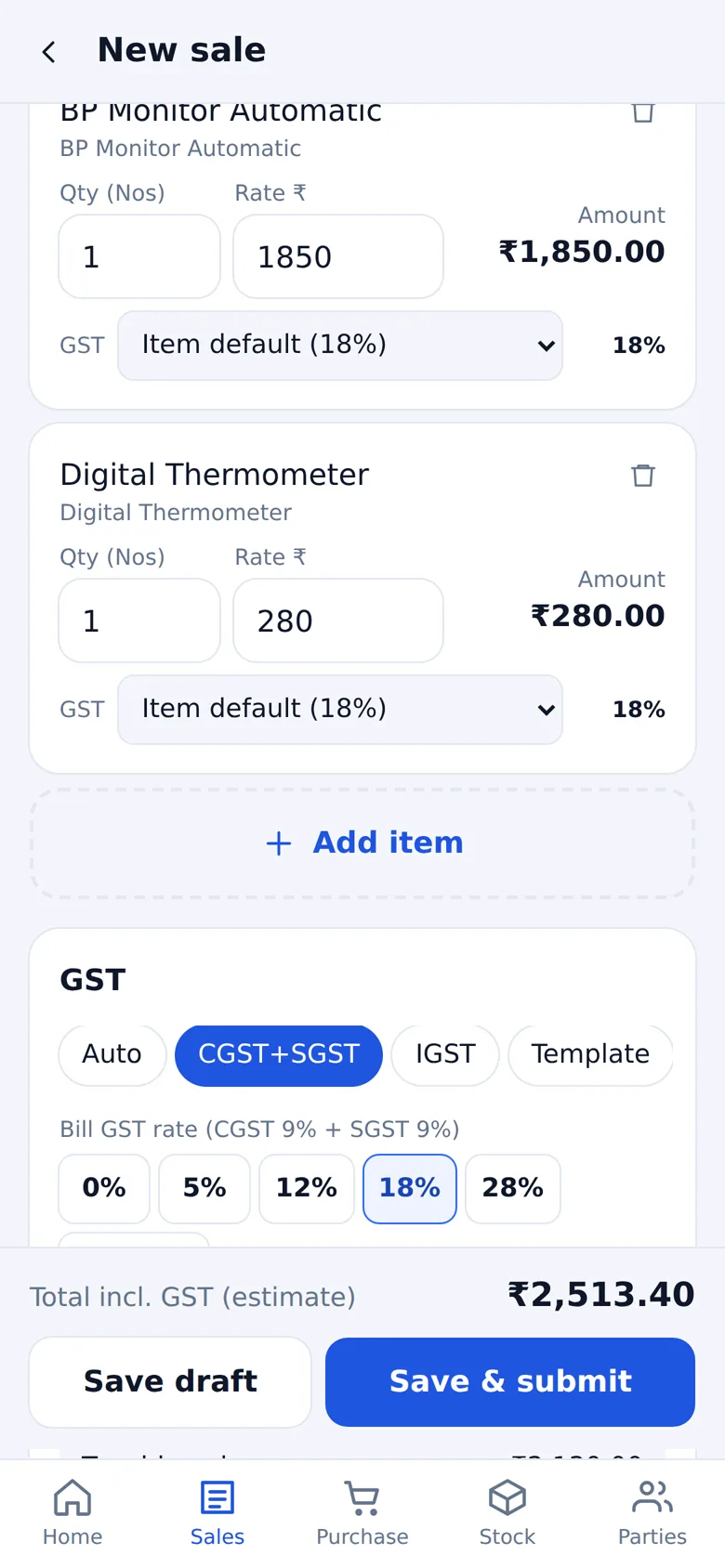
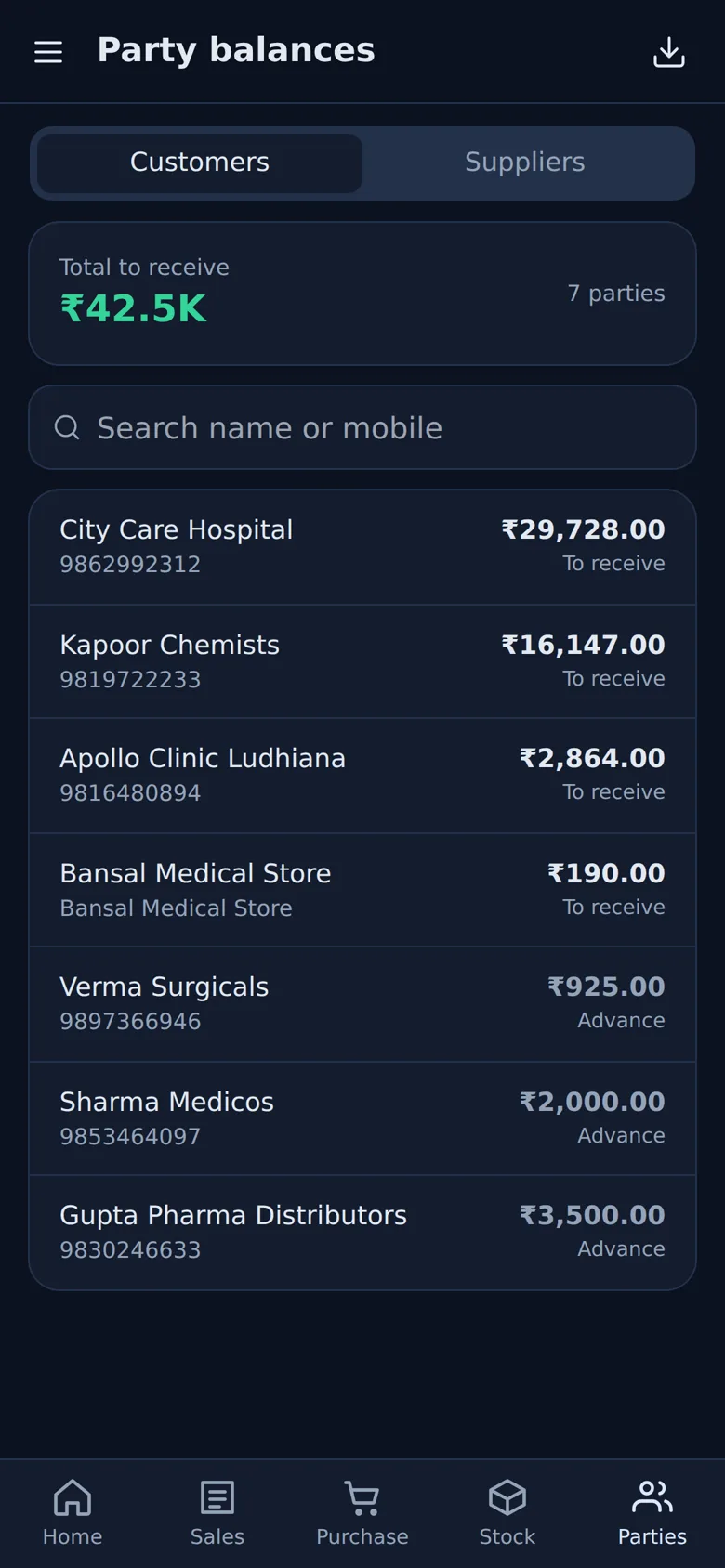
Run the accounts of your Payroll & HR ERP from your phone
Owners and managers can check the books, bank balance and expenses on the WebSoftOS Business app — live on the same books as the desk.
- GST bills with flexible GST — auto by state, any rate, per item
- Receive and make payments, record expenses
- Stock, party balances and WhatsApp payment reminders
- GSTR-3B, GSTR-1, HSN summary and P&L
Android and iPhone, installed from the browser. Salary runs, statutory returns and payslips stay in the full web ERP.
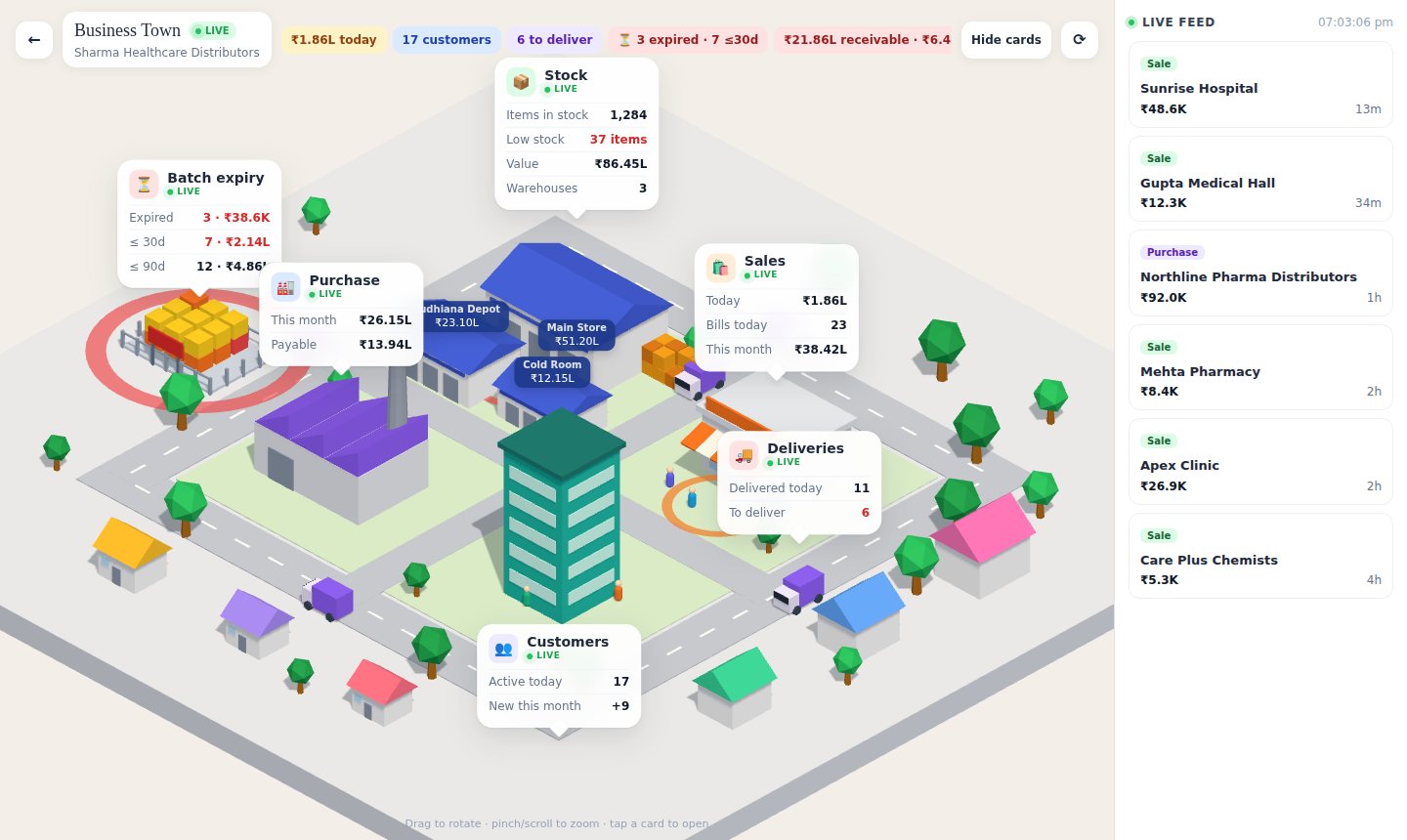
Your company, live in 3D
See the accounts side of your company — sales, purchases, stock, receivables and cash — as one live 3D view.
- Today’s and this month’s sales and purchases
- Stock value and warehouse-wise stock
- Receivables, overdue and cash and bank
- Live feed of the latest bills
Opens in any browser or on your phone, with your ERP login. Industry screens such as projects, trips or classes stay in the ERP.
Built on the WebSoftOS core
GST & e-invoicing
GST invoices, e-invoice and e-way bill generated from the same transaction.
Inventory & warehouses
Batches, expiry, multiple godowns and stock that always matches the books.
Statutory payroll
PF, ESI, professional tax and TDS calculated in one payroll run.
Hermes AI agents Add-on
Add-on for every app: agents answer questions on live data and draft routine entries for your approval.
Automatic backups
Every site is backed up automatically and served over HTTPS.
Your own domain
Run on a WebSoftOS subdomain or your own domain with role-based access.
Who it is for
- Companies with 20–5,000 employees running payroll in-house
- Payroll outsourcing / payroll bureau firms managing many client companies
- Labour contractors and manpower agencies
- Companies with branches in several states (different PT and LWF rules)
Integrations
- Biometric attendance devices
- Bank salary-file formats
- Accounts posting of payroll journals
- Employee self-service
Combine with other modules
Every WebSoftOS module runs on the same accounts and login, so you can add more as you grow.
Payroll & HR ERP vs Tally Prime and Busy
| Tally Prime / Busy | WebSoftOS Payroll & HR ERP | |
|---|---|---|
| Where it runs | Installed on an office PC or LAN; remote use needs remote access or third-party hosting | In the browser, fully hosted — nothing to install |
| Industry workflows | Not built in; needs add-ons (TDL) or Excel | Built in for your industry |
| GST e-invoice and e-way bill | Supported | Supported, from the same transaction |
| Backups | Your responsibility | Automatic backups |
| Pricing | Licence plus yearly renewal for updates | Monthly plans from ₹1,199 + GST, free live demo |
Moving from desktop accounting? See the full Tally alternative and Busy alternative comparisons.
ERPNext for payroll and HR in India
WebSoftOS is built on ERPNext, the open-source ERP, and runs it for you as a managed service: hosting, automatic backups, updates, India GST compliance and the Payroll & HR modules are included, from ₹1,199 per month plus GST. You get ERPNext without running a server or paying for separate hosting, and your data can be exported at any time.
Pricing
Payroll & HR ERP runs on the same WebSoftOS platform plans: a free live demo, Starter at ₹1,199/month (3 users), Growth at ₹2,999/month (10 users), Pro at ₹5,999/month (25 users), plus GST. Each plan is a fully hosted ERP site with automatic backups, HTTPS and your own domain. See pricing for current inclusions.
Implementation
Payroll go-live takes 2–4 weeks: employees, salary structures and YTD figures are imported, statutory settings are configured per state, and we run at least one month in parallel with your current payroll and resolve every discrepancy before cut-over.
Payroll & HR guides for Indian businesses
The Labour Codes and the 50% wage rule: what payroll teams should check now
The new Labour Codes redefine wages. What the 50% rule means for PF, gratuity and leave encashment, with a worked salary example and a payroll checklist.
Read post → PayrollPayroll software cost in India: Excel vs software vs a bureau, and when to switch
Payroll in Excel, through a bureau or on software: what each costs a growing Indian employer, when to switch, and what payroll bureaus and CA firms should look for.
Read post → PayrollA monthly payroll compliance checklist for Indian employers
A month-end checklist for Indian payroll: PF, ESI, professional tax, TDS on salary, payslips and bank file, with the common errors to avoid.
Read post →Frequently asked questions
What is the best payroll software for Indian SMEs?
A good Indian payroll system must get PF, ESI, PT, LWF and TDS right automatically, produce bank files and payslips, and handle arrears and F&F without spreadsheets. WebSoftOS Payroll OS does this and adds multi-company billing for payroll bureaus; very small teams (<10 people) can often manage with a simpler payroll app.
Is it suitable for payroll outsourcing companies?
Yes. Client companies, branches, client billing rates, payroll invoices and SLA tracking are built in, so one team can run payroll for many clients and bill them from the same system.
Does it support both tax regimes?
Yes. Old and new regime slabs are configured, employees declare investments, and TDS is projected for the year. Compare regimes with the TDS calculator.
Can we run a parallel payroll before switching?
Yes. Parallel-run checks compare WebSoftOS results with your current payroll and list every discrepancy by employee and component.
Does it generate bank salary files?
Yes. Bank templates define each bank's file format, and bank transfer batches produce the file from the approved payroll run.
Does the payroll software calculate full and final settlement and gratuity?
Yes. After exit clearance, the F&F settlement works out pending salary, notice pay or notice recovery, leave encashment, gratuity and any arrears. Gratuity rules, such as the wage basis, the 15/26 formula, minimum qualifying years and the ceiling, are configured per client.
Can it prepare TDS challans, Form 24Q data and Form 16?
Yes. TDS is projected for the year under the old or new regime, challans are recorded with the BSR code and deposit date, quarterly data for Form 24Q is generated, and Form 16 is produced for each employee. You file the return with your usual return utility.
How does it catch payroll errors before salaries are paid?
Each run goes through validation checks with severity levels, a run checklist and an approval step. A parallel run compares results with your old payroll, and a three-way reconciliation matches the payroll net pay against the bank file and the accounts.
What is the best multi-company payroll software in India for payroll outsourcing agencies?
Payroll bureaus need client-wise companies, statutory compliance and client billing in one place. WebSoftOS Payroll ERP handles client companies, PF/ESI/PT/TDS, bank files and payroll invoices to clients.
Is there affordable cloud payroll software with automatic PF, ESI, professional tax and TDS?
WebSoftOS Payroll ERP calculates PF, ESI, PT, LWF and TDS in each payroll run. Payroll is an industry module, so it starts on the Growth plan at ₹2,999 a month (₹2,499 billed yearly) plus GST; payroll bureaus are priced per employee, ₹15–25 a month, minimum ₹1,999. A free live demo is available.
Related resources
Salary Calculator
Free in-hand salary calculator for India: convert annual CTC to monthly take-home after PF, ESI, professional tax and income tax (new regime FY 2025-26).
Use calculator → Free toolPF Calculator
Free PF calculator: compute employee 12% PF, employer EPF 3.67%, EPS 8.33% (₹15,000 ceiling), EDLI and admin charges per month and per year.
Use calculator → Free toolESI Calculator
Free ESI calculator: check ESI applicability (₹21,000 limit) and compute employee 0.75% and employer 3.25% ESIC contribution per month.
Use calculator → Free toolTDS on Salary Calculator
Free income tax and TDS on salary calculator for FY 2025-26: compare old vs new tax regime with standard deduction, 87A rebate, 80C, 80D, HRA and home-loan interest.
Use calculator → Free toolCTC Calculator
Free CTC calculator for employers: add employer PF, ESI, gratuity, bonus and insurance to monthly salary components to get the true cost to company.
Use calculator → Free toolGratuity Calculator
Free gratuity calculator under the Payment of Gratuity Act: 15/26 formula, 5-year eligibility, rounding of months and ₹20 lakh tax exemption.
Use calculator → TemplateSalary Sheet Excel Template
Free monthly salary sheet Excel template for India with basic, HRA, allowances, paid days, PF, ESI, professional tax, TDS and net pay formulas.
Download → TemplateMonthly Payroll Processing Checklist
Free monthly payroll checklist (Excel): attendance cut-off, joiners and exits, arrears, statutory deductions, approvals, bank file, PF/ESI/PT/TDS deposit due dates.
Download → TemplateEmployee Joining Checklist
Free employee onboarding checklist for Indian companies: documents, PAN, Aadhaar, UAN, ESI, bank details, offer letter, policies, assets and payroll setup.
Download → GuideHow to run payroll for multiple companies in India
How to run payroll for multiple companies or clients in India: entity setup, state-wise PT and LWF, PF/ESI codes, cost allocation, approvals, bank files and client billing.
Read guide → CompareManual payroll vs payroll software
Compare manual Excel payroll with payroll software: processing time, PF/ESI/PT/TDS accuracy, arrears, bank files, audit trail and compliance risk.
Read comparison → CompareSoftware for payroll outsourcing companies
What payroll outsourcing companies need from software: multi-company payroll, client billing, SLAs, contractor settlement and statutory compliance across states.
Read comparison → CompareExcel vs ERP: when it is time to move
Excel vs ERP: when spreadsheets break down for billing, stock, payroll and projects — and how to move to a cloud ERP without losing what works.
Read comparison →