 WebSoftOS
The POS for play centres: tickets, timers, wristbands and parties in one till
Check children in with a signed waiver, watch every timer on the floor, put café orders on the child’s tab, run birthday parties and visit packs — and have it all land in your accounts and VAT reports.
- Kids play & FECs
- English & Arabic waivers
- UAE VAT ready
- Multi-branch
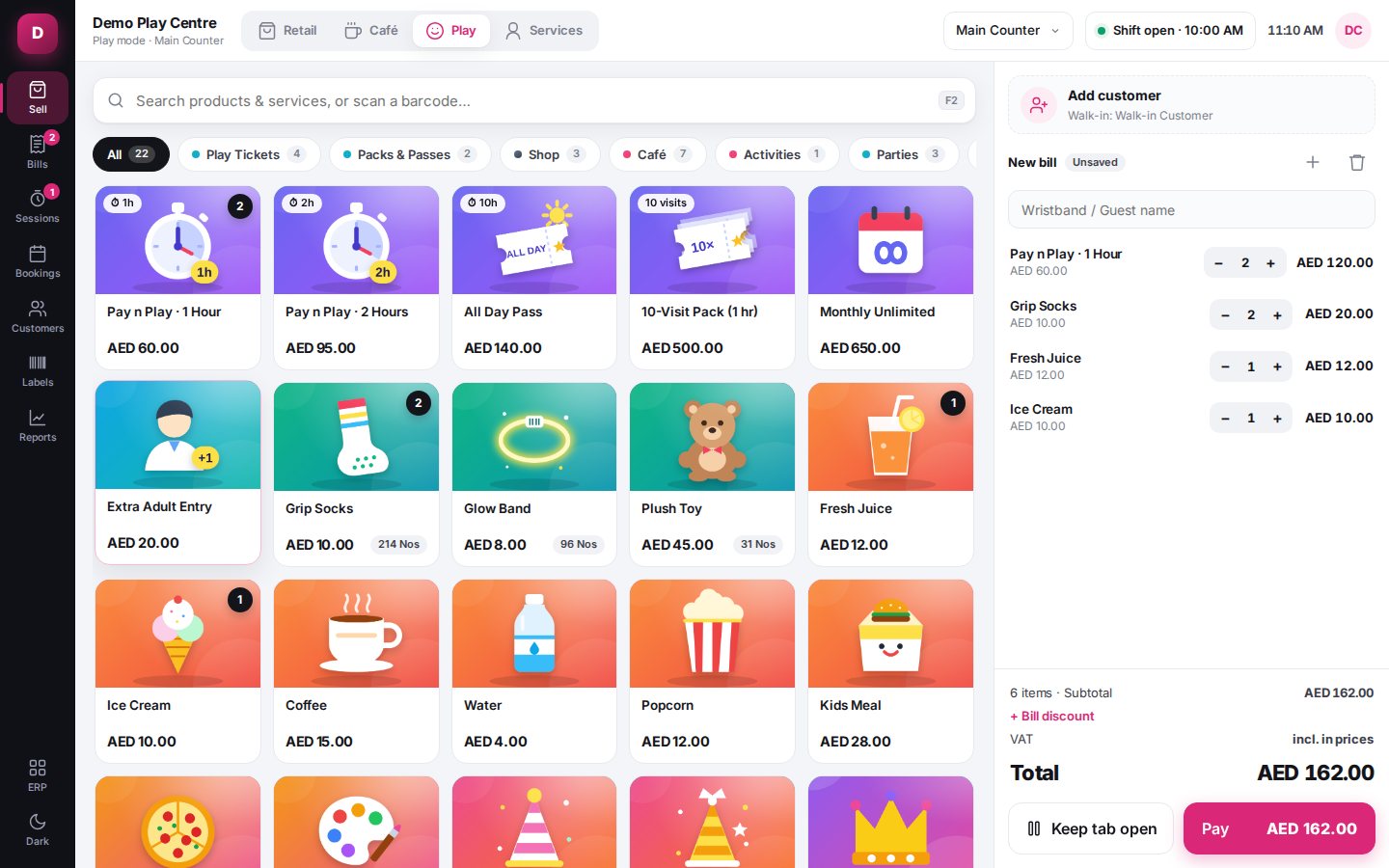
WebSoftOS Play Center POS is a touch point-of-sale for kids play areas and family entertainment centres. It handles timed entry, waivers, wristbands, the live floor, café and retail, birthday parties, school groups, visit packs and shifts, on top of WebSoftOS accounting.
What your cashier sees
Real screens from the Play Center POS, shown with sample data.
Tickets, waivers and check-in at the counter
Sell timed or all-day play tickets, pick the family, and check children in with their signed waiver on file. Waivers are signed on a tablet kiosk in English or Arabic, or on the parent’s phone from a QR code, and every version is kept.
- Timed and all-day tickets, age rules per zone
- Families with children, guardians and mobile numbers
- Waiver kiosk in English and Arabic with finger signature, or QR signing on the parent’s phone
- Capacity check per zone before check-in
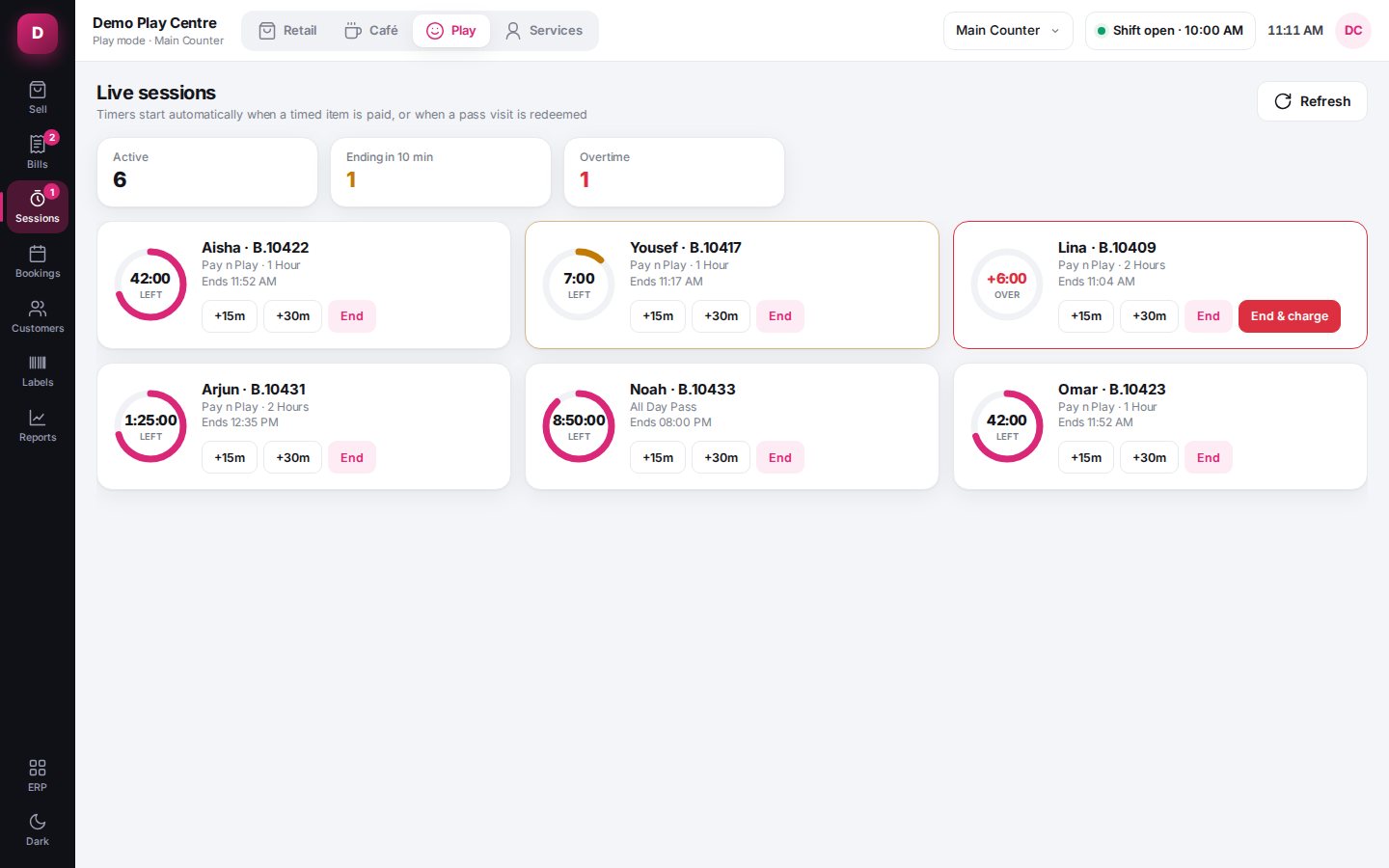
Every child on the floor, with a timer
The floor screen shows who is inside, how long they have left and who has run over. Overtime is added to the bill at check-out, and staff can extend time or move a child to another zone.
- Live timers with warning and overtime states
- Extend time, transfer zone, check out
- Occupancy counts children and adults inside
- Exit scan at the gate
Barcode wristbands for children and adults
Print wristband labels or use pre-printed bands. A keyboard-style scanner finds the child, the family, a school group or a product from one scan box.
- Printed or pre-printed bands, with duplicate and “already inside” checks
- Optional rule: every child and adult must have a band scanned
- Scan a band to open the child’s tab or check them out
- EAN-13 product barcodes and label printing (A4 and thermal)
Café and shop on the child’s tab
Juice, snacks or grip socks for a child already inside go on their tab. Everything — play time, overtime and the tab — is paid on one invoice at check-out.
- Add to a tab by scanning the band
- Café and retail modes in the same POS
- Quantity discounts such as “buy 5 ice creams, 10% off”
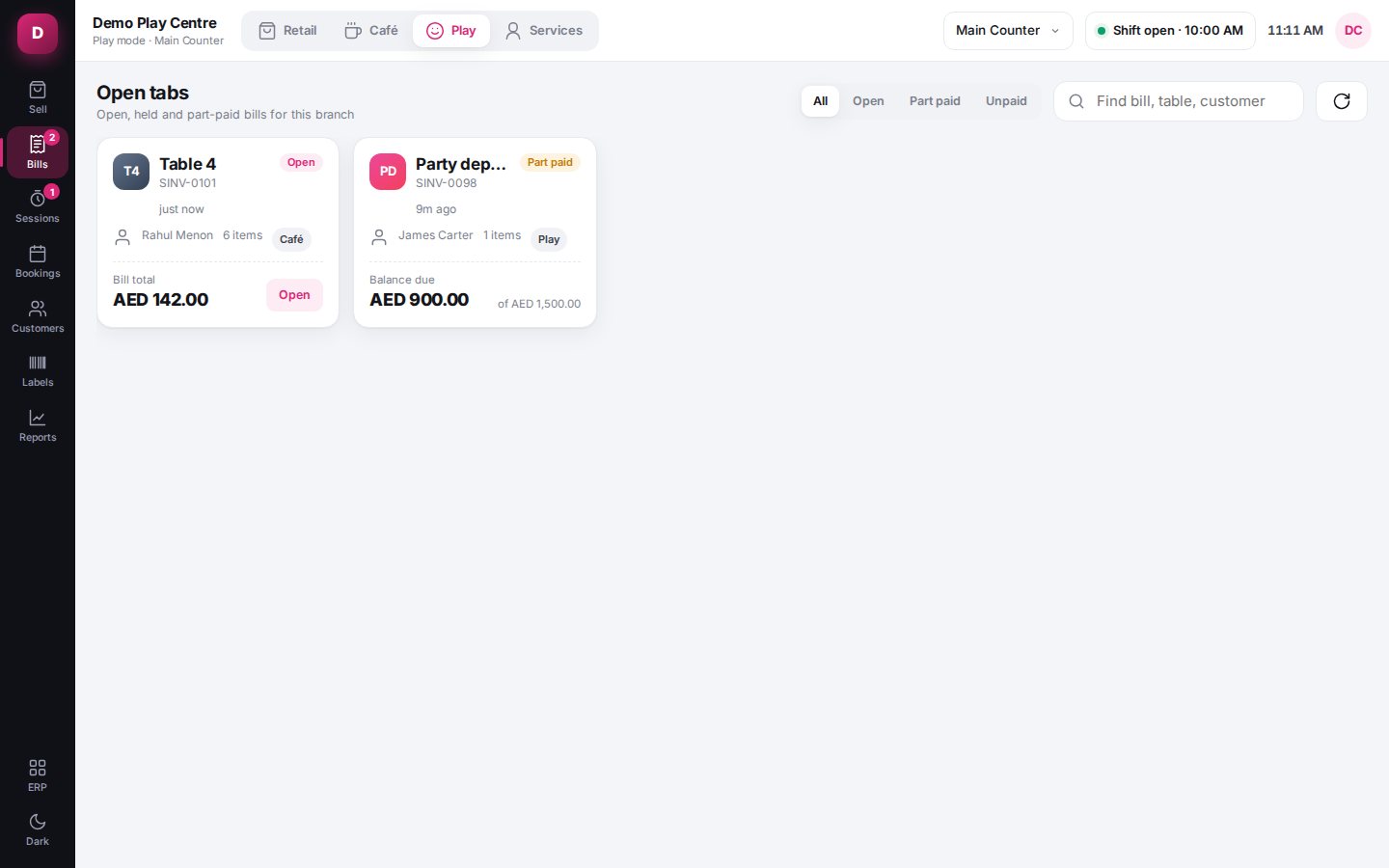
- Held bills and open tabs survive a refresh
Party packages, rooms and deposits
Book parties into rooms on a calendar across branches, hold a slot for a set time, take a deposit by payment link, and settle the balance on the day with extra kids and add-ons.
- Packages with included kids, extra-kid price and contents you can swap
- Room calendar with tentative holds that expire
- Deposits, final settlement and one final invoice
- Add-ons such as decor, balloons and activity stations
Visit packs, memberships and rewards
Sell a 10-visit pack once and redeem visits at check-in for AED 0. Every purchase, use and reversal is written to a ledger, so balances are never argued about.
- Visit packs and memberships per customer
- Entitlement ledger: purchase, use, undo with reason
- Loyalty points programme
- Package usage report
Check in a school trip in seconds
Bring a class or a camp in as one group, bill the organisation or take payment on the spot, and check the group out together or child by child.
- Bulk group check-in
- Pay now or bill to the organisation with a payment link
- Group exit: all at once or by scanning bands
Split payments, shifts and cash control
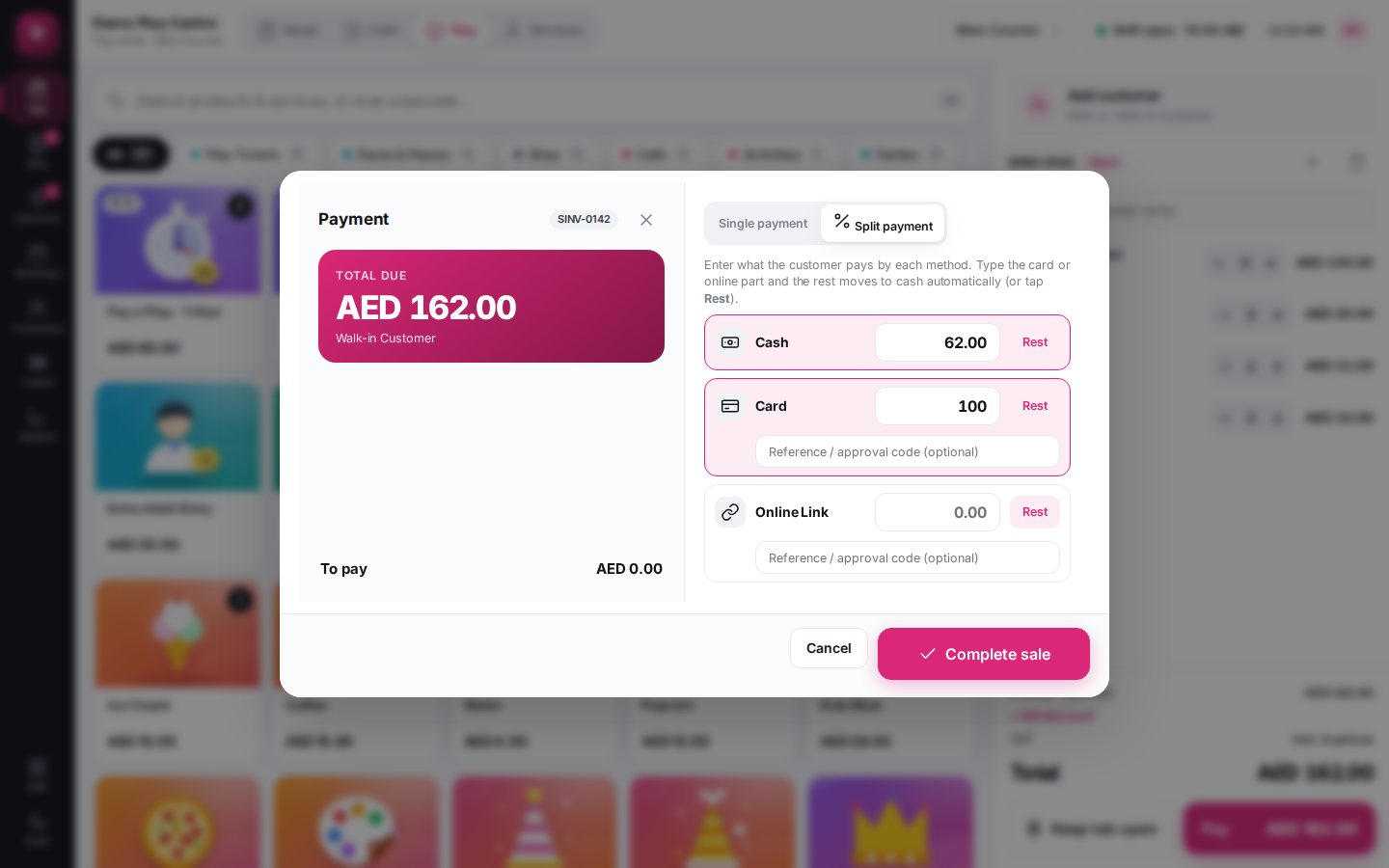
Take cash, card and online payments on one bill in any split, with change on cash only. Sales need an open shift, and the shift report shows what should be in the drawer.
- Single or split payment, part payments and receivables
- Card payments with approval code and last four digits
- Online payment links (N-Genius) for deposits and remote payments
- Shift open/close with expected cash, X-report
Built for the whole centre, not just the till
Reports
Sales, visits, occupancy, parties, packs and shifts, for GPOS and the play floor together.
Four modes, one till
Play, Café, Retail and Services in one POS, switched from the top bar.
Multi-branch
Branches with their own POS profiles, rooms and zones, on one set of books.
Audit trail
An append-only audit log of sensitive actions, with roles and permissions for staff.
Price on request
Every centre is different: number of branches and terminals, scanners and wristband printers, party rooms and setup. Tell us about your centre and we will send a quote, usually the same day.
- Setup, item and package configuration
- Staff training
- Accounts and VAT set up for your company
Screens show sample data.
Questions about the Play Center POS
How much does the Play Center POS cost?
Price is on request, because it depends on the number of branches, POS terminals, hardware (scanners, wristband and receipt printers) and setup. Call or WhatsApp us on +91 88476 50312 for a quote.
Who is it for?
Kids play areas, soft play centres, indoor playgrounds, trampoline parks, family entertainment centres and edutainment centres — any venue that sells timed entry, parties and café items.
Does it work with VAT in the UAE?
Yes. Prices can include VAT at 5%, amounts show in AED, and invoices print in a UAE VAT invoice format with your TRN. For Saudi ZATCA Phase 2 or UAE e-invoicing, read our GCC e-invoicing guides — those integrations are separate.
Can parents sign the waiver on their phone?
Yes. Staff can show a QR code that opens the waiver on the parent’s phone, or parents sign on a tablet kiosk in English or Arabic. Waiver templates are versioned.
Which card terminals and payment links are supported?
Card payments are confirmed by the cashier entering the approval code from the terminal. Online payment links use N-Genius once your merchant account is connected. Ask us about integrating a specific terminal.
Is the accounting included?
Yes. The POS runs on WebSoftOS (ERPNext), so every sale, payment, deposit and refund posts to your accounts, stock and VAT reports without exports.
See it with your own tickets and packages
Book a demo and we will set up your play tickets, party packages and café items so you can try check-in, the floor and check-out.